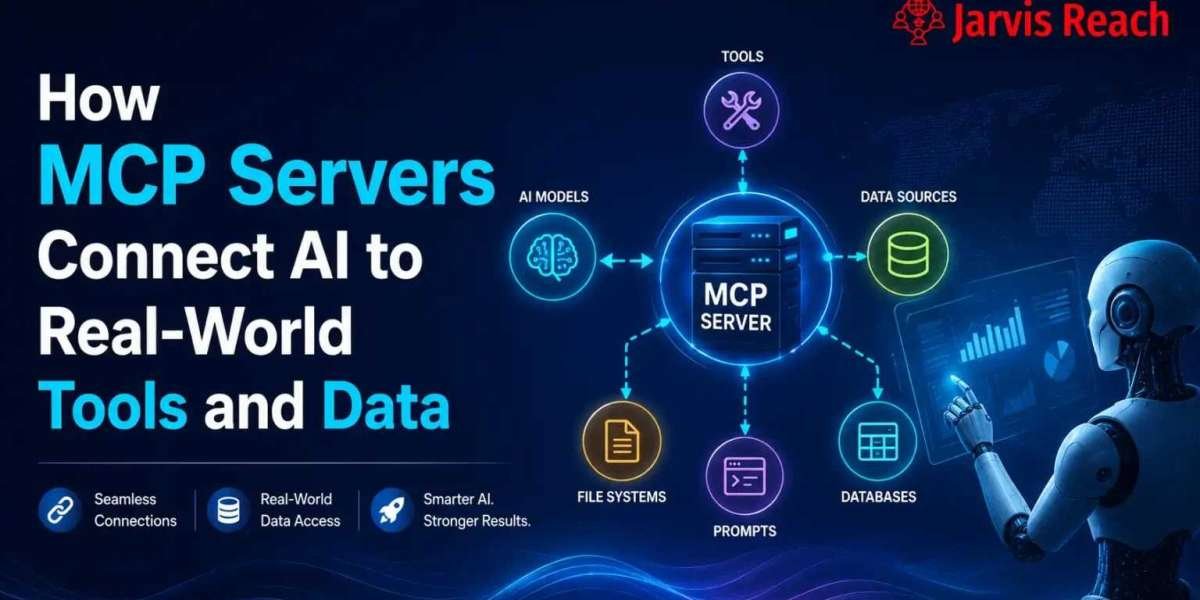

AI applications are becoming more powerful by connecting with external data, software, and business tools. MCP Server provides a structured way for AI platforms to communicate with these external resources. It can help connect APIs, SQL databases, enterprise data, file systems, and other data sources through a consistent architecture.
For developers and businesses, this approach can make it easier to create AI applications that can retrieve information and interact with approved tools.
What Is MCP Server?
MCP Server is a server that implements the Model Context Protocol and provides AI applications with access to defined tools and resources.
Instead of building a completely separate integration for every AI application, developers can expose useful capabilities through an MCP Server.
An MCP Server can provide access to:
- APIs
- SQL databases
- Enterprise data
- File systems
- Business applications
- External tools
- Other approved data sources
This helps AI applications interact with information and systems outside the model itself.
How MCP Server Works
An MCP-based architecture commonly includes an AI application, an MCP Client, and an MCP Server.
The basic workflow is:
- A user sends a request to an AI platform.
- The AI determines whether an external tool or resource is needed.
- The MCP Client communicates with the appropriate server.
- The MCP Server accesses the requested resource.
- The server returns the result.
- The AI platform uses the information to respond.
This creates a clear separation between the AI application and the systems it needs to access.
What Is an MCP Client?
The MCP Client is the communication component between an AI application and an MCP Server.
It can discover available capabilities and send requests to the server. Depending on the implementation, those capabilities can include tools, resources, and prompts.
For example, an AI assistant could use an MCP Client to request approved information from a database or call a business API through an MCP Server.
MCP Server and API Integration
An API allows different software applications to communicate. MCP Server can expose API-based capabilities to AI applications in a structured way.
This can be useful for connecting AI systems with:
- CRM software
- Business platforms
- Cloud services
- Analytics tools
- Internal applications
- Automation systems
Instead of limiting an AI assistant to generating text, API connectivity can allow it to interact with approved services.
Enterprise Data and AI
Businesses often store important information across multiple systems. Enterprise data may include customer records, reports, internal documentation, product information, and company knowledge.
MCP Server can provide controlled access to relevant enterprise resources.
Potential benefits include:
- Faster information retrieval
- AI-powered internal search
- Automated reporting
- Better business workflows
- Improved employee productivity
However, enterprise data should always be protected with appropriate permissions and access controls.
SQL Databases as AI Resources
SQL databases are widely used to store structured business information. An MCP Server can provide controlled database-related capabilities to an AI application.
For example, an AI assistant might use an approved database tool to retrieve specific business information and summarize the results for a user.
Database access should be carefully designed to prevent unauthorized queries, data exposure, or destructive operations.
Working With Multiple Data Sources
Modern organizations rarely keep all information in one location. They may use databases, APIs, cloud platforms, documents, and internal applications.
MCP Server can help connect AI applications with multiple data sources through a consistent interface.
This can reduce the need to create completely different AI integrations for every system.
Prompt Templates
Prompt templates provide reusable instructions for AI applications.
They can be useful when organizations want consistent AI workflows for tasks such as:
- Customer support
- Document analysis
- Business reporting
- Data summarization
- Content generation
Reusable prompts can help standardize how an AI application approaches common tasks.
Authentication and Security
Authentication is an important part of any system that connects AI with external resources.
An MCP implementation should verify who or what is requesting access and apply appropriate permissions.
Security practices can include:
- Strong authentication
- Access control
- Least-privilege permissions
- Credential protection
- Request validation
- Activity monitoring
API keys, passwords, tokens, and other credentials should never be exposed publicly.
Stateful and Stateless MCP Applications
AI applications can use different approaches to managing session information.
Stateless Architecture
A stateless application handles requests independently without relying on stored session state.
This approach can simplify scaling and infrastructure management.
Stateful Architecture
A stateful application maintains information about an ongoing session or interaction.
This can be useful for applications that require:
- Conversation continuity
- Persistent sessions
- Personalized workflows
- Long-running tasks
The right architecture depends on the application's requirements.
MCP Server and Backends
AI applications often depend on multiple backends, including APIs, databases, internal services, and business systems.
MCP Server can provide a structured interface between these backends and an AI platform.
This allows organizations to build AI workflows around their existing infrastructure instead of completely replacing their current systems.
File Systems and AI Applications
File systems can contain valuable business documents, reports, text files, and other resources.
An MCP Server can expose approved file-related capabilities to an AI application. This can enable tasks such as:
- Searching documents
- Reading approved files
- Summarizing information
- Analyzing documents
- Organizing knowledge
File permissions should be carefully configured so that AI applications cannot access files they are not authorized to use.
Why Use MCP Server?
MCP Server can provide several advantages for AI development.
Standardized Integration
A consistent protocol can simplify how AI applications communicate with external capabilities.
Flexible Data Access
AI applications can work with different resources, including APIs, databases, files, and enterprise systems.
Better Automation
Connected tools can allow AI applications to participate in more useful workflows.
Easier Maintenance
Separating AI applications from external systems can make integrations easier to manage and update.
Scalable Architecture
Organizations can add or modify connected servers without redesigning the entire AI application.
Common MCP Server Use Cases
MCP Server can support many AI scenarios.
Customer Support
AI assistants can retrieve approved customer information and interact with support systems.
Business Research
AI applications can search connected enterprise resources and summarize relevant information.
Data Analysis
Approved database and analytics tools can provide information for AI-assisted reporting.
Knowledge Management
AI systems can access company documents and internal knowledge bases.
Developer Productivity
AI assistants can work with approved development tools, documentation, repositories, and project resources.
Best Practices
A successful MCP implementation should focus on both functionality and security.
Developers should:
- Use least-privilege permissions.
- Protect authentication credentials.
- Validate tool inputs.
- Restrict sensitive resources.
- Monitor access activity.
- Keep connected software updated.
- Review permissions regularly.
- Avoid exposing confidential information unnecessarily.
These practices help reduce security risks while allowing AI applications to use external resources effectively.
The Future of MCP Server
AI systems are increasingly expected to do more than generate text. They need to retrieve information, use tools, interact with software, and work with current data.
MCP Server provides a structured approach to this connected AI model. By linking an AI platform with approved tools and resources, organizations can build applications that are more capable and useful.
As AI adoption grows, standardized communication between models and external systems can become increasingly valuable for developers and businesses.
Conclusion
MCP Server provides a flexible foundation for connecting AI applications with external systems and information. Through an MCP Client, AI platforms can work with APIs, enterprise data, SQL databases, data sources, prompt templates, backends, authentication systems, and file systems.
Whether an application uses a stateful or stateless architecture, careful access control and security practices are essential. With the right implementation, MCP Server can help developers build connected, scalable, and intelligent AI applications that work with real-world data and tools.





